> ## Documentation Index
> Fetch the complete documentation index at: https://docs.cobalt-ia.com/llms.txt
> Use this file to discover all available pages before exploring further.
# Task settings
> Automatically receive a recap of your tasks, daily or weekly, at the time of your choice.
## Task recap
Cobalt can **automatically** send you a recap of your tasks — every day or every week, at the **time of your choice**.
To set it up, go to your **personal settings**, **Notifications** section.
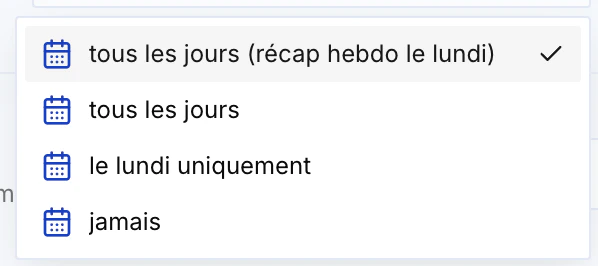
 Several frequencies are available:
* **Every day** (with a weekly recap on Monday)
* **Every day**
* **Mondays only**
* **Never**
You also choose the **time** the recap is sent.
Several frequencies are available:
* **Every day** (with a weekly recap on Monday)
* **Every day**
* **Mondays only**
* **Never**
You also choose the **time** the recap is sent.