> ## Documentation Index
> Fetch the complete documentation index at: https://docs.cobalt-ia.com/llms.txt
> Use this file to discover all available pages before exploring further.
# Profile enrichment
> Automatically complete candidate profiles with verified emails, direct phone numbers, and LinkedIn data — no manual research required.
Cobalt's enrichment engine fills in the contact details you need to reach candidates without manual research. Whether you are working a single profile or several hundred, Cobalt runs a cascade query across multiple data sources, verifies every email address it finds, and writes the results directly to the candidate's profile.
## Three ways to enrich
Open a candidate card and click **Enrich**. Cobalt fetches the verified email address, direct phone number, LinkedIn profile URL, work experience history, listed skills, and education — all in one click. Results appear on the profile within seconds.
Select multiple profiles from any list view and click **Enrich All**. Cobalt processes profiles in batches and updates each record automatically. Ideal after importing a set of CVs, refreshing a talent pool, or running a new Balt search.
Install the [Cobalt Chrome Extension](/en/integrations/extension-chrome). From any LinkedIn profile, click the Cobalt icon to extract the candidate's email and phone number, add them to a Cobalt list, and sync the record to your CRM — all without leaving the LinkedIn tab.
## Cascade method and verification
Cobalt uses a **cascade (waterfall) method**: it queries multiple data providers in sequence and stops as soon as a valid result is found. This multi-source approach maximises coverage while maintaining data freshness.
Email addresses go through a **double verification step** — a syntax check followed by an SMTP check to confirm the mailbox exists and can receive messages. Only addresses that pass both checks are written to the profile.
Effective coverage depends on the profile and sector. Cobalt does not guarantee a fixed coverage rate for every profile type.
## Enrich a record by importing a document
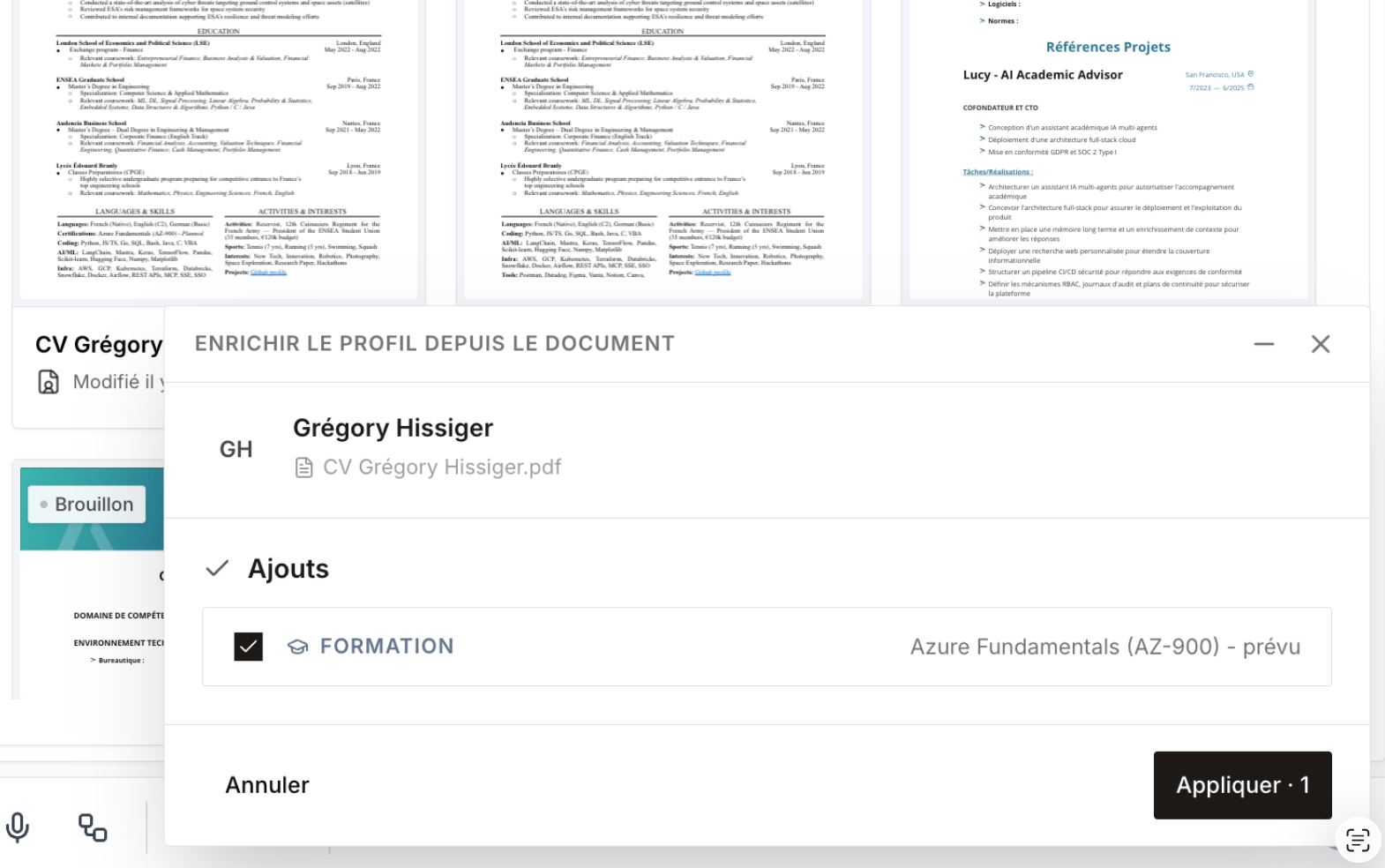
By **importing a document** (CV, PDF profile…), you can **enrich a candidate's record** with the new data it contains. When information is **contradictory** with existing data, Cobalt helps you **resolve conflicts** to choose which data to keep.
## Credit system
Enrichment consumes credits from your monthly plan quota, shared across your entire team.
| Action | Credit cost |
| ------------------ | ----------- |
| 1 email enrichment | 5 credits |
| 1 phone enrichment | 10 credits |
**Monthly credits included by plan:**
| Plan | Monthly credits |
| ---------- | --------------- |
| Free | Not included |
| Core | `[TO CONFIRM]` |
| Copilot | `[TO CONFIRM]` |
| Enterprise | Unlimited |
**Additional credit packs** are available at any time without a plan change. See the [Pricing page](https://cobalt.fr/tarifs) for details.
**Historical database enrichment:** at onboarding, you can request a one-off enrichment of your entire existing database in a single batch operation. Cobalt processes the full export and returns enriched records. Contact your account manager to include this in your onboarding plan.
## GDPR compliance
All enriched data is sourced exclusively from GDPR-compliant providers and stored on EU infrastructure with end-to-end encryption. Candidates can exercise their right to deletion at any time, and Cobalt propagates the deletion across all associated records automatically.
## Plan availability
| Plan | Enrichment |
| ---------- | ------------------------------- |
| Free | Not included |
| Core | Included (monthly quota) |
| Copilot | Included (larger monthly quota) |
| Enterprise | Unlimited |
## Frequently asked questions
Cobalt queries multiple third-party data providers in sequence — the process stops as soon as a valid, verified result is found. This multi-source approach maximises coverage while keeping data fresh and accurate.
Yes. Every email address goes through a double verification step: a syntax check to confirm the address is correctly formatted, followed by an SMTP check to confirm the mailbox exists and can receive messages. Only addresses that pass both checks are written to the profile.
Yes. Cobalt offers a one-off historical enrichment add-on, available at onboarding. You export your existing database, Cobalt processes it, and returns fully enriched records — no manual work required on your side. Speak to your account manager to set this up.
Cobalt sends you a notification when your credit balance runs low. You can purchase an additional credit pack directly from your account settings at any time — there is no service interruption and no need to upgrade your plan.
 ## Credit system
Enrichment consumes credits from your monthly plan quota, shared across your entire team.
| Action | Credit cost |
| ------------------ | ----------- |
| 1 email enrichment | 5 credits |
| 1 phone enrichment | 10 credits |
**Monthly credits included by plan:**
| Plan | Monthly credits |
| ---------- | --------------- |
| Free | Not included |
| Core | `[TO CONFIRM]` |
| Copilot | `[TO CONFIRM]` |
| Enterprise | Unlimited |
**Additional credit packs** are available at any time without a plan change. See the [Pricing page](https://cobalt.fr/tarifs) for details.
## Credit system
Enrichment consumes credits from your monthly plan quota, shared across your entire team.
| Action | Credit cost |
| ------------------ | ----------- |
| 1 email enrichment | 5 credits |
| 1 phone enrichment | 10 credits |
**Monthly credits included by plan:**
| Plan | Monthly credits |
| ---------- | --------------- |
| Free | Not included |
| Core | `[TO CONFIRM]` |
| Copilot | `[TO CONFIRM]` |
| Enterprise | Unlimited |
**Additional credit packs** are available at any time without a plan change. See the [Pricing page](https://cobalt.fr/tarifs) for details.